 New Zealand
  United Kingdom
  Singapore
  Malaysia
  Canada (Français)
 Australia


AI workforce planning: How to future-proof your talent strategy

Contents
If you’re leading a business right now, you already know that finding and keeping the right people is one of the hardest parts of the job. The data backs that up, with our 2025 Recruitment Report revealing that 78% of Australian businesses say hiring has become harder as a direct result of economic uncertainty. Costs are up, finding quality candidates is an ongoing challenge and every role that stays open too long starts costing you in ways that don’t always show up on your spreadsheets.
That’s where AI workforce planning comes in. It moves your HR function from reactive to strategic, so you’re not scrambling to fill gaps.
We’ve wrapped up everything you need to know about workforce planning and how you can get started.
What is AI workforce planning?
AI workforce planning uses your human resources information system data to drive forward-looking decisions. Instead of piecing things together from multiple systems or reacting to headcount problems after they’ve already hit, you get a live, connected view of your team, your growth plans and the market conditions shaping both.
The goal is to have fewer surprises, better decisions and more time spent on the work that moves your business.
What workforce planning looks like without the right tools
Most businesses are still managing headcount in a mix of spreadsheets, email chains and memory. A hiring manager flags a need, it gets logged somewhere, HR loses visibility across teams and by the time a role is approved and posted, weeks have already passed.
When your planning process is fragmented, you’re slower to respond exactly when speed matters most. AI workforce planning replaces that fragmentation with a single connected view of your org structure, your gaps and your pipeline.
How AI workforce planning works in practice
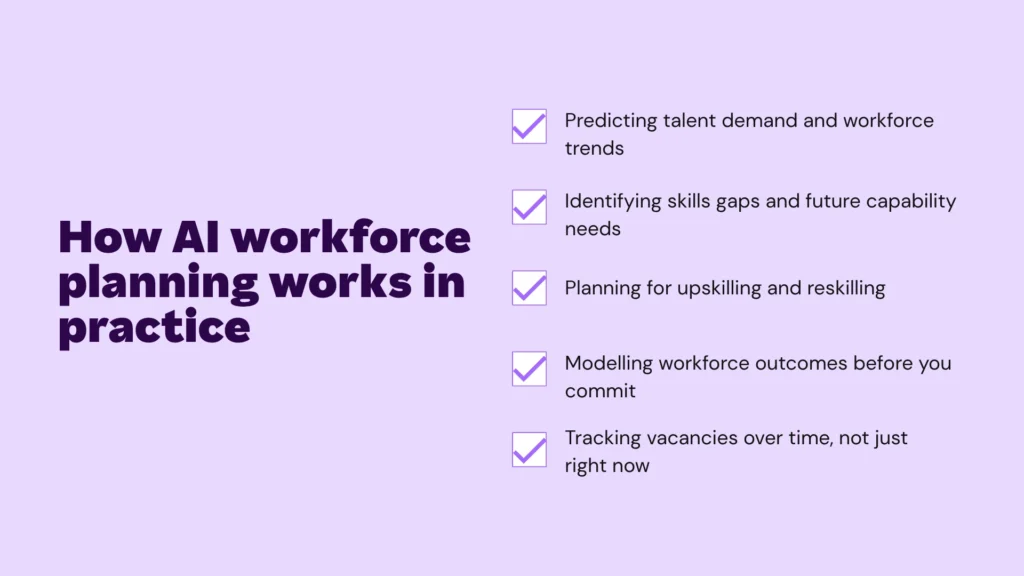
Predicting talent demand and workforce trends
Most hiring problems start as planning problems. By the time a team is stretched and a role urgently needs filling, you’ve already lost weeks. AI tools change that timeline by spotting patterns in your workforce data and flagging what’s coming before it arrives.
When technology is identifying growth patterns, seasonal swings or team changes early, you can move on hiring before anyone starts feeling the squeeze, instead of scrambling once the pressure is already on.
A business that knows it typically needs four extra customer service staff every December can start recruiting in October instead of November. That’s the difference between walking into the Christmas rush with a full team and spending it understaffed.
Identifying skills gaps and future capability needs
Your business is always moving and the skills you need shift just as fast. What worked for your team two years ago may not be the right fit for where you’re heading now.
AI tools can help map the skills you have across your business against what your next stage of growth requires. The output is a specific view of which teams are under-resourced, which capabilities you need to hire for and where upskilling your existing people is the faster, cheaper path.
Planning for upskilling and reskilling
Once you’ve spotted the gaps, AI tools let you build learning plans that are targeted to teams and functions, so your training budget goes exactly where it needs to go.
There’s a gap to close here. Our AI Paradox research found that 51% of Australian workers have picked up their AI skills through social media platforms like TikTok and YouTube rather than through their employer. Only 22% of workers see AI upskilling as their employer’s job at all and 31% say it’s on them to figure it out alone. When training happens outside the business, you lose visibility into what your team knows and you have no say in whether they’re learning it well.
The same research found that 61% of Australian workers already believe AI is helping them build more valuable skills. That appetite is there, but what’s missing in most businesses is a structured pathway to direct it, which is exactly where a targeted, training plan can step in.
The businesses getting ahead are the ones using that investment to build capability from within, not just hiring their way out of every understaffing hurdle.
Modelling workforce outcomes before you commit
Big business decisions often have workforce implications. A new product line, a market expansion or a shift in how you deliver services; all of these change what your team needs to look like. AI-powered scenario planning lets you test those decisions before you’re locked in.
You can model what happens to headcount if you grow revenue by 20% this year or what resourcing looks like if you expand into a new region in 12 months. For example, if your modelling shows that hitting a 20% revenue target requires two additional account managers by Q3, that’s a hiring timeline you can work back from today.
The numbers don’t make the decision for you, but they do give you and your leadership team a shared, grounded view of the trade-offs.
Track vacancies over time, not just right now
Spotting a gap is only useful if you can track whether you’re closing it. A workforce plan that lives in a single snapshot, a quarterly review deck or a spreadsheet that gets updated on an ad-hoc basis, isn’t as useful as it could be when forward planning.
The goal is to make vacancy tracking an ongoing discipline. You’ll want to look at how many roles are open, for how long, in which teams and whether that number is trending in the right direction. The businesses that do this well have a system that makes it easy to maintain.

Challenges and considerations when using AI in workforce planning
Your data has to be accurate first
Any workforce planning process is only as accurate as the underlying employee data you feed into it. If positions, reporting lines or locations are out of date, your planning view will reflect that. Before you invest time in building a workforce plan, do a data audit and make sure your records are current.
The people responsible for headcount need to engage with it
Workforce planning only works if managers are actively logging vacancies, flagging changes and keeping their team structures current, instead of tracking gaps informally or in their own spreadsheets. Without that buy-in, even the best planning process drifts out of sync with reality quickly.
Planning supports the decision, it doesn’t make it
Good workforce planning shows you where gaps are, what they cost and what the trade-offs look like. The judgment call about whether to hire, restructure, upskill or wait still belongs to your HR leaders and leadership team. The data gives you a stronger foundation for that conversation, not a substitute for it.
How Employment Hero brings this together
See vacant positions directly in your org chart
Employment Hero’s workforce planning tool gives admins a mirror view of their organisation, with the added functionality of adding vacant positions. This visual format enhances tracking by offering clear insights into how vacant positions are structured, helping you make informed workforce planning decisions. Instead of tracking headcount gaps in a separate document, you can see exactly where a vacancy sits, who it reports to and what budget is attached to it.
From a single vacant position in the chart, you can:
- Attach job title, location, primary manager and budget details
- Trigger a recruiting flow directly into a job posting
- Onboard a new hire into the role once it’s filled
- Fill the position with an existing employee if you’re restructuring internally
This means your workforce plan and your org structure stay in sync, not drifting apart across different tools and spreadsheets. Learn more about it here.
Connect your HR, recruitment and payroll data in one place
Employment Hero’s Employment Operating System connects your HR, recruitment and payroll data in one place. Employment Hero’s workforce planning tool gives you a org chart with vacancies built in, so you can see exactly where your team has gaps at any point in time. From there, our AI-powered hiring tools match you to relevant candidates and move them through the pipeline from open role to hired employee, without the back-and-forth that usually slows the process down.
The time saving potential here for businesses is huge. Employment Hero customer, Thermosash Group, went from spending a week screening a single applicant to screening 10 candidates in under 20 minutes using our AI Recruitment Agent.
How to get started
Start by being clear on the specific problem you’re trying to solve. High turnover in certain roles? Slow time-to-hire? Capability gaps in a growing team? Defining the problem first makes it much easier to pick the right tools and measure whether they’re actually working.
The fastest way to find out is to see it in action. Book a demo with our team and we’ll walk you through what it looks like for a business like yours.
The information in this article is current as at 25 May 2026 and has been prepared by Employment Hero Pty Ltd (ABN 11 160 047 709) and its related bodies corporate (Employment Hero). The views expressed in this article are general information only, are provided in good faith to assist employers and their employees and should not be relied on as professional advice. Some information is based on data supplied by third parties. While such data is believed to be accurate, it has not been independently verified and no warranties are given that it is complete, accurate, up to date or fit for the purpose for which it is required. Employment Hero does not accept responsibility for any inaccuracy in such data and is not liable for any loss or damages arising directly or indirectly as a result of reliance on, use of or inability to use any information provided in this article. You should undertake your own research and seek professional advice before making any decisions or relying on the information in this article.
Related Resources
-
 Read more: Psychological safety at work: what it is, why it matters, and how to tell if you have it
Psychological safety at work: what it is, why it matters, and how to tell if you have it
Psychological safety determines whether your team can speak up without fear. Learn what it looks like, how to spot its…
-
 Read more: Workplace stress risk assessment: are you actually okay going into the new year?
Workplace stress risk assessment: are you actually okay going into the new year?
Before the new year kicks off, answer these questions honestly. A practical stress check for employees. Read more.
-
 Read more: The true cost of a bad hire in Australia
The true cost of a bad hire in Australia
Learn the true cost of a bad hire in Australia and learn practical steps to get your hiring right the…


