 Australia
  New Zealand
  United Kingdom
  Singapore
  Malaysia
  Canada (Français)


Streamline the hiring process with offer letters
-
Jessica Johnson
Contents
Offer letters are an important part of the hiring process. They’re one of the first impressions that candidates form about your company, and they often include going back and forth with sensitive information. In a nutshell, they need to be secure and seamless for everyone involved.
That’s why we’re excited to announce our latest product update – Offer Letters! You can now send offers to candidates without adding them as Employment Hero users, enabling you to remove tedious work, gain more control over the new hire flow, and create even better candidate experiences.
What you can do
- Create offer letter templates
- Send offer letters to candidates who don’t have a Employment Hero account
- Send offer letters from the recruiting module
- Revise an offer (perfect for when there are edits to make)
- Hire candidates from the new ‘Offers’ tab
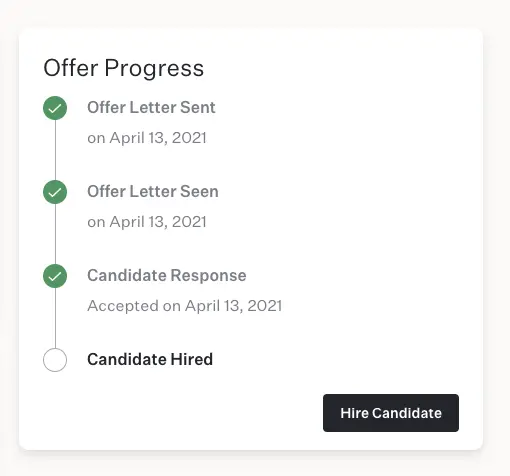
- Track the status of an extended offer
Why they are important
Offer letters are essentially the beginning of an employee relationship – they allow you to highlight relevant details about your company and outline the job’s responsibilities, therefore it’s pivotal that the agreement is clear and positive.
As offer letters also act as a legal document, terms and conditions must be outlined. In the event that the candidate requests to negotiate terms like salary or benefits, the document serves as a critical reference point.
Answers to frequently asked questions
How do offer letters connect to employee onboarding?
After a candidate has signed an offer, you’ll have the opportunity to easily hire them from the offer letter page. The offer letter information will auto-populathe the fields during onboarding (e.g. employee name, start date, compensation, etc.).
Will candidates receive a signed copy of their offer letter?
Yes, after signing the offer letter, candidates will receive a copy via email.
Does an offer automatically expire?
Yes, an offer will automatically expire and withdraw on the expiration date you input when creating an offer.
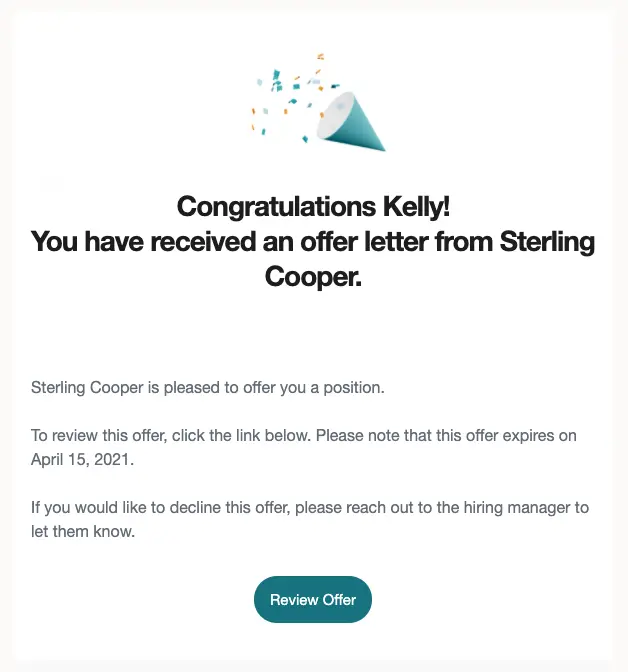
What does the email look like when a candidate receives an offer?
You can see an example below. The email includes essential information such as the candidate’s name, company name, and expiration date, as well as a button to allow candidates to review and sign the offer.
How will I know when a candidate accepts an offer?
When a candidate accepts an offer, we will notify you via email and in-app. You can also see the offer status on the offer details page. Note: only the person who sent the offer letter will receive notifications.
Enable your team with Employment Hero
Employment Hero unifies all applicant tracking: create your job board, add hiring managers right from the Employment Hero platform, and share posts to LinkedIn and Indeed. And, when candidates are successfully hired, you can easily send them an offer letter within Employment Hero, then move them to onboarding, payroll, and other Employment Hero modules seamlessly.