














Policy tracker template: Google Sheets
Published
Policy tracker template: Google Sheets
Published
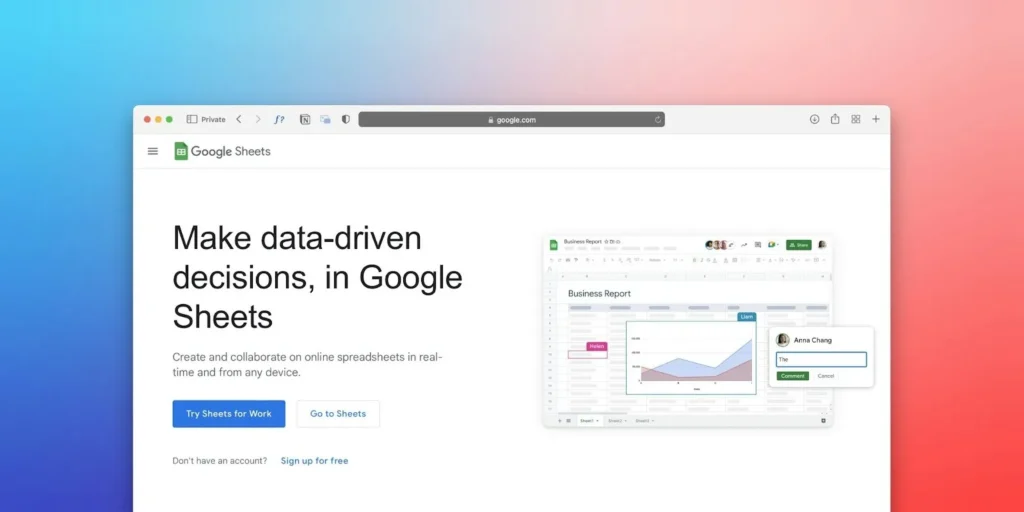
Let’s be real for a second. Nobody starts a business because they love administrative paperwork. You do it because you have a vision, a product or a service that the world needs. But then reality hits. You hire people. You need rules. You need policies. And suddenly, you need a way to track who has read what, when they signed it and if that version is even current anymore.
It’s a headache. We get it. And we’re not going to pretend a spreadsheet is the future of HR. Manual tracking isn’t a scalable long-term solution. But if you’re not ready for HR software yet, you still need structure. You still need control. You still need a source of truth.
That’s why we built this guide. We’re going to help you tame the beast that is policy management. We have a solid Google Sheets template for you to download, but we’re also going to show you why spreadsheets might just be the training wheels you eventually need to take off. This template isn’t the be-all and end-all. It’s a stopgap. A smarter way to create order in chaos while you build.
What is a policy tracker?
A policy tracker is exactly what it sounds like, but it’s also the difference between a compliant business and a lawsuit waiting to happen. At its core, it is a central register—a “source of truth”—that logs every policy your company has.
Think of it as your safety net. It records the policy name, version number, who it applies to and the status of employee acknowledgments. When a dispute arises (and sadly, they sometimes do), you don’t want to be digging through filing cabinets or searching for lost emails. You want to point to a line item that says, “Yes, Dave signed the social media policy on November 12th.”
It keeps your team accountable and helps you sleep better at night. Simple as that. Will it automate reminders or maintain a full audit trail for you? No. But it gives you visibility. And visibility is a powerful first step.
Benefits of using a policy tracker template in Google Sheets
Why Google Sheets? Because it’s accessible, it’s collaborative, and let’s be honest, it’s free. For growing teams, free is a very attractive price point. Especially when you’re still figuring out systems and processes.
Using a cloud-based template allows for real-time updates. You aren’t emailing “Policy_Tracker_FINAL_v2_ACTUAL_FINAL.xlsx” back and forth. You have one live document. Multiple people can view it, and you can control who has editing rights.
It gives you:
- Visibility: See gaps in your compliance instantly.
- Accountability: Track who is lagging behind on their reading.
- Organization: Keep your internal housekeeping tidy without buying expensive enterprise tools before you’re ready.
Think of this as your foundation layer. When the manual admin starts taking more time than it saves, that’s usually the signal you’ve outgrown it.
How to use this template in Google Sheets
- Download and copy: Click the link to open the sheet and make a copy to your own Drive.
- Customize your columns: We’ve added the essentials (Policy Name, Version, Date Issued), but every business is different. Add a column for “Department” or “Review Date” if you need it.
- Input your current policies: List everything from your workplace health safety policy to your dress code.
- Add your people: List your employees.
- Start tracking: Use the checkboxes or status dropdowns to mark off when an employee has reviewed and signed a document. Just remember — every update, every reminder and every version change is manual. The sheet won’t chase anyone for you.
Hot tip: Use conditional formatting to turn cells red if a policy is overdue for review. It acts like a visual alarm bell for your admin team.
Prefer Excel? No stress. Once you’ve got your Google Sheets template set up, just click File > Download > Microsoft Excel (.xlsx). Boom—instant Excel version. You get all the same tracking power, offline or inside your own Microsoft universe. We kept this template simple because we know you don’t have time to learn complex formulas.
Using Google Sheets for HR documentation
Spreadsheets are the Swiss Army knife of the business world. They can do almost anything, but that doesn’t mean they are the best tool for everything.
The Pros:
- Flexibility: You build it how you want it.
- Cost: Zero dollars.
- Access: Available anywhere with an internet connection.
The Cons:
- Manual entry: You have to type everything in. If Dave leaves, you have to manually update the sheet.
- Security risks: It is easy to accidentally share a sheet with the wrong person or have a formula break.
- Scalability: When you hit 50, 100 or 150 employees, that spreadsheet becomes a monster. Scrolling through 100 rows to find one signature is not efficient.
For smaller teams, Sheets is a great start. But as you scale, dedicated employee management software usually takes over where spreadsheets fail, automating the chasing and filing for you. There’s a ceiling to manual systems. Growth tends to find it quickly.
Designing a list template for streamlined tracking

If you are determined to DIY this (we respect the hustle), design is everything. A messy tracker is useless.
Keep your layout clean. Freeze the top row so you can always see your headers while you scroll. Use data validation for columns like “Status” so people can only select “Signed,” “Pending” or “Not Applicable.” This prevents typos and keeps your data clean.
Group your policies logically. You might want a section for onboarding docs, another for conduct and a third for safety. Speaking of conduct, having a clear discipline policy tracked here is vital for managing difficult conversations down the road.
Leveraging Google Sheets templates for compliance and organization
Compliance isn’t a “set and forget” activity. Laws change. A policy you wrote in 2021 might be illegal in 2026.
Your tracker needs to help you manage compliance risks, not just store data. Add a “Next Review Date” column for every policy. Set a calendar reminder to check that column every quarter.
If you are using onboarding software, this often happens automatically. But in Sheets, you are the automation engine. You are the reminder system. You are the follow-up workflow. That’s manageable at the beginning. It gets heavier as your team grows.
Best practices for managing HR data in spreadsheets
HR data is sensitive. Even a simple policy tracker tells a story about your business and your people. Here is how to keep it safe:
- Lock it down: Only give “Edit” access to the people who absolutely need it. Everyone else gets “View Only” or nothing at all.
- Back it up: Google Drive is reliable, but accidental deletions happen. Download a backup copy once a month.
- Keep it clean: Don’t mix this data with payroll or medical info. Keep your policy tracking separate from sensitive personal data.
- Audit trails: Google Sheets has a “Version History.” Use it. If a date changes mysteriously, check the history to see who changed it and when.
Get practical document support backed by experts
Let’s face it. Writing policies from scratch is risky. Unless you have a law degree, you might miss a clause that protects your business.
We strongly recommend using templates created by employment law experts. It gives you a strong foundation and saves you hours of writing time. Whether it’s a standard contract or a specific redundancy notice letter template, starting with a professional draft is always smarter than winging it.
All the HR documents you need, in one place
Imagine a world where you don’t need the spreadsheet. Where you upload a policy once, click “Send to All” and watch the digital signatures roll in. Where the system chases Dave for his signature, so you don’t have to. Where every document, from a termination of employment letter to a holiday request, lives in one secure, cloud-based platform.
That is what we do. Our HR software replaces the manual grunt work of spreadsheets with automated, seamless workflows. It’s about working smarter, not harder. We don’t claim to “ensure” compliance. But we help you build systems that support it and scale with you.
The Google Sheet is a solid starting point. Employment Hero is built for what comes next.
A guide to compliant HR document templates
Your policies are the rulebook for your business culture. They define how you treat each other and how you operate.
Don’t let them become dusty documents in a forgotten folder. Make them living parts of your business. Use this tracker to get organized today. But keep your eyes on the horizon. Manual systems create order. Scalable systems create momentum.
Ready to stop the scroll and start streamlining? Download the template above and get your house in order. When the spreadsheet starts to feel tight, we’ll be here to show you what scalable looks like
Register for the template
Related Resources
-
 Read more: Sabbatical leave policy: Your ultimate employer guide
Sabbatical leave policy: Your ultimate employer guide
Learn about sabbatical leave policies, including eligibility, paid vs. unpaid options and how to implement a program that benefits employees…
-
 Read more: Policy tracker template: Google Sheets
Policy tracker template: Google Sheets
Download our policy tracking template to streamline your management processes with Google Sheets.
-
 Read more: Running payroll in Alberta shouldn’t feel like guesswork
Running payroll in Alberta shouldn’t feel like guesswork
Running payroll in Alberta? From the 8/44 overtime rule and WCB registration to the new 27-week job-protected leave, here is…

