


Your Top 2025 Tax Season Questions, Answered
.
Contents
Ah, tax season. That magical time of year when paperwork multiplies, deadlines loom and the phrase “remittance reconciliation” is enough to make a grown employer weep. You’re not just running a business; you’re an unofficial tax collector for the government, juggling T4s, taxable benefits and the ever-watchful eye of the CRA. It’s a tough job, but someone has to do it.
Let’s cut the BS. Managing payroll taxes can feel like navigating a maze blindfolded. But what if it didn’t have to be a nightmare? What if you had the answers before the questions even started causing you stress? That’s where we come in.
For Humi by Employment Hero Payroll users, tax season is just another part of the process, not a crisis. Our payroll experts and powerful software are here to help you get it right without the late nights and headaches. We’ve rounded up the top questions we hear from employers and answered them all.
Let’s make this year’s tax season your easiest one yet. Dive in.
1. What does it mean when I have a +/- on Humi by Employment Hero’s PIER Analysis Report, and what should I do now?
Let’s start with the Pensionable and Insurable Earnings (PIER) Analysis Report. It sounds scary, but it’s basically just a spotlight designed to catch discrepancies in CPP/QPP and EI before the CRA does.
If you see a zero in the “variance” fields, congratulations, you’re golden. If you see a number, don’t panic—it just means there is a difference between what was calculated and what should have been there. You can easily see a discrepancy if there’s an amount other than zero in any of the “variance” fields.
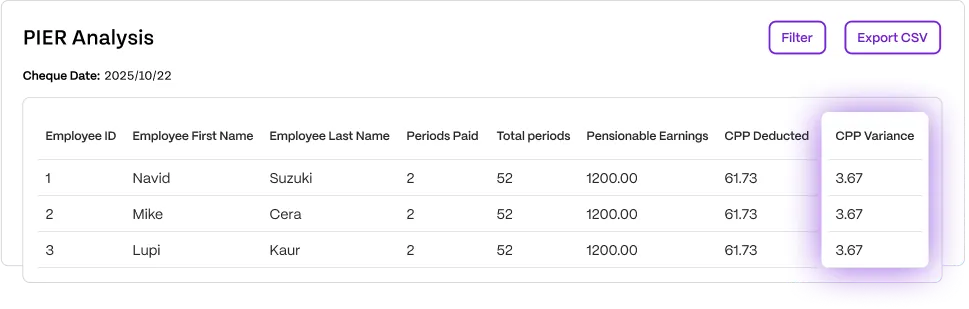
- Positive (+) discrepancy: You’ve over-remitted. Essentially, there is an “overage.”
- Negative (-) discrepancy: You’ve under-remitted. There is a “deficiency.”
Before you start writing cheques or asking for refunds, check if the discrepancy is valid. Total up your CPP/QPP and EI columns. If you have over-remitted, follow the instructions on the PIER provided by the CRA. If you owe money, check our year-end guide for the payment process.
If you have over-remitted, follow the instructions on the PIER provided by the CRA. If you’ve determined that you need to make additional payments, you can view the process in our year-end guide.
Why is there a PIER deficiency on Humi by Employment Hero’s PIER Analysis Report?
Just because the report flags a variance doesn’t mean you messed up. The Humi by Employment Hero PIER Report highlights things the CRA might flag. It’s a warning system, not a verdict.
If the CRA inquires about these variances, you’ll need to provide an explanation. Possible reasons for variances include, but are not limited to:
- An employee was on payroll but had $0 pay in a period.
- Someone turned 18 or 70 mid-year, changing their contribution status.
- An employee was on leave but remained “active” in the system.
- You have an EI premium reduction rate lower than the standard 1.4x.
- Your company started with us mid-year.
- An employee was paid through multiple off-cycle runs.
Smaller variances, such as those involving pennies, are typically not scrutinized by the CRA and are often the result of rounding errors. These usually won’t require further explanation.
Humi by Employment Hero’s PIER Report is designed to help you identify and investigate variances, giving you the tools to determine their cause and decide on the appropriate next steps. For compliance and liability reasons, we cannot provide advice on specific employee variances. If you’re new to reconciling a PIER Report, we recommend consulting with an accountant.
Please note, Humi by Employment Hero’s PIER Report is intended as a helpful tool and does not replace the CRA’s official PIER Report.
3. How do I send my terminated employees T4s?
Once you’ve edited, reviewed, and finalized your T4 package in Humi by Employment Hero, you’ll be able to send T4s to all employees via the email associated with their Humi by Employment Hero profile. Terminated employees cannot log into their Humi by Employment Hero profile anymore to edit their email, so it’s good practice to check if the email on their Humi by Employment Hero account is a personal email, and update it if required. You can find the emails on file in the T4 Preview Report.
To update a terminated employee’s email address:
- Go to the “People” module on the left navigation pane.
- Under the “Directory” tab, click on the filter icon next to the “Status” column and select the “Terminated” checkbox.
- Follow the steps in this support article to update an employee’s email.
4. What do I need to consider if I joined Humi by Employment Hero part way through a calendar year?
We recommend that you follow up with your previous payroll provider to confirm they do not file T4s, as this will overstate actual earnings and will require reconciliation.
Review the company’s Year-to-Date (YTD) records to ensure they include all payroll details from the 2025 periods prior to your switch to Humi by Employment Hero. If you find any omissions, you can employ Humi by Employment Hero’s T4 Adjustment Tool to integrate the required YTD information.
Note: Your Humi by Employment Hero PIER Report may flag your CPP/QPP and Employer CPP/QPP as a discrepancy since you’ve joined mid year, due to the CPP per pay period exemption which would not be captured when importing YTDs.
5. My previous payroll provider filed 2025 T4s for the first part of the year, what do I do?
Reach out to your former payroll provider to retract the submission. If not addressed, there’s a potential for duplicative reporting of your employees’ earnings.
6. An employee has informed me that there is an error on their T4. How do I revise a T4 that’s been filed already?
We’re all human. Mistakes happen. If you’ve already submitted your T619 file to the CRA and an employee points out that their income is wrong or their address is from three apartments ago, you need to fix it.
The CRA requires an Amended T4 and a new, updated T619. The good news? You can handle this directly in Humi by Employment Hero Payroll. Just follow our instructions for creating T4 amendments and get it sorted.
7. Why can’t I access or make changes in the Year End Adjustment tool?
If the tool is locked, it’s for your own protection. Once you produce or complete your T4 package, we restrict access to the Year End Adjustment tool so you don’t accidentally change data that’s already been finalized.
Need to get back in? You’ll have to delete the T4 tax package.
Warning: Deleting the package wipes out any manual tweaks you made to T4s within the module. Proceed with caution.
8. Where can I obtain a copy of my T4 summary?
It’s not hiding, we promise. You can find the T4 summary in two spots:
- Inside the T4 module, sitting right beneath your individual employee T4s.
- Included automatically when you download the full tax package.
9. Am I required to send my employees a new TD1 form to fill in?
Employers must have new employees fill out federal and provincial TD1 forms at the time of hire. Subsequently, employees should update and submit revised TD1 forms if there are modifications to their tax deductions, place of residence, and/or SIN.
10. What steps should I take if I forgot to add a terminated employee to Humi by Employment Hero after finalizing the tax package?
If you forgot to add a terminated employee to Humi by Employment Hero after finalizing the tax package, you won’t be able to use Humi by Employment Hero to generate, file, or send the employee a T4. Instead, you’ll need to manually prepare their T4 outside of Humi by Employment Hero using the CRA Web Forms option.
Want to learn more? We’ve got you covered.
We’ve barely scratched the surface. If you want to walk into tax season like you own the place, you need the full playbook.
Check out our 2025 Year-End Guide. It’s packed with checklists to keep you on track, plus step-by-step instructions on how to review records, adjust T4s and RL-1s and set your business up for a smooth payroll year ahead.
Related Resources
-
 Read more: Bereavement Leave in Québec: Guide for Employers
Bereavement Leave in Québec: Guide for Employers
Unsure about bereavement leave in Québec? Learn the CNESST rules for paid vs. unpaid days, immediate family definitions and how…
-
 Read more: Vacation pay in Quebec: The complete employer’s guide
Vacation pay in Quebec: The complete employer’s guide
Confused by the CNESST reference year? Learn how to calculate vacation pay in Quebec, manage the 3-week entitlement, and more…
-
 Read more: Understanding the SR&ED program: A gateway to innovation for Canadian businesses
Understanding the SR&ED program: A gateway to innovation for Canadian businesses
Read along to learn all about the SR&ED program and determine if your business qualifies for it.

